Kanban Software Development with GreenHopper
Since the release of GreenHopper 6.0 teams have been able to take advantage of new Kanban boards (formerly called Rapid Boards). These Kanban boards make it easy for any team - be they in software development or customer support - to get started quickly and start realising the benefits of being agile immediately. One of the key tennets of Kanban is that you don't start by changing everything. Instead, you start by measuring the current process and then begin to explore areas for improvement. Start with what you have today and incrementally improve from there. In this post we'll look at how teams can take advantage of the power and flexibility of GreenHopper to help them get work done.
Rapid Boards
 Since the release of GreenHopper 6.0 teams have been able to take advantage of new Kanban boards (formerly called Rapid Boards). These Kanban boards make it easy for any team - be they in software development or customer support - to introduce Kanban practices quickly and start realising the benefits of being agile immediately.
One of the key tennets of Kanban is that you don’t start by changing anything. Instead, start by mapping out the current process and measuring it, then begin to explore areas for improvement. Kanban encourages teams to start with what they have today and incrementally improve from there - no big bang change like in a Scrum transformation.
In this post we’ll look at how teams can take advantage of the power and flexibility of GreenHopper to help them get work done efficiently. We’ll explore four areas
- building the perfect visualisation for your team,
- using swimlanes and quick filters to highlight important tasks,
- limiting work in progress through column constraints, and
- measuring and reporting the cycle time to provide predictability
Build the perfect visualisation
We want to ensure that the team members of Delta Squadron can easily check and update GreenHopper throughout the day, allowing them to get on with their work. To do this we want a board that maps to the teams process and supports them in delivering quality results to their customers. We'll now explore how.What is the workflow?
GreenHopper will map the teams existing workflow onto a board. This is is great as it is the easiest way for a team to adopt Kanban - by mapping their existing workflow. Once we have created a Kanban board via GreenHopper's Getting Started page (JIRA -> Agile -> Getting Started) we can configure the board and add columns (Tools -> Configure -> Columns). If you are starting with a blank JIRA project you will see To Do, In Progress and Done.If you are a small team the easiest step from here is to switch to the GreenHopper Simplified Workflow. If you are in a larger company you will very likely want to share your workflow with other teams - perhaps common steps such as ‘In Review’ or ‘Awaiting Deployment’ are shared between many teams to provide a consistent experience and language. If you’re in the second category you may want to have some commonality through a shared Workflow ((Sharing Your Workflow)) set up by your JIRA System Administrator.
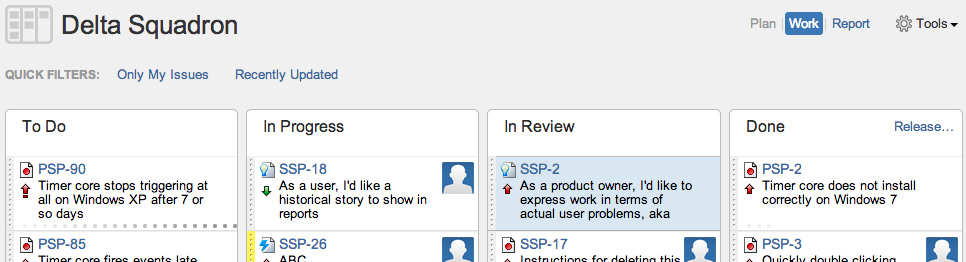
The Delta Squadron team has four columns on their board: To Do, In Progress, In Review, and Done. To Do is their backlog of tasks (some user stories ((Telling Better Stories with User Story Mapping)), some bugs), In Progress is the work the team members are currently working on, In Review are those tasks that are being code reviewed (by someone other than the person that did the coding), and finally Done represents those tasks that have been merged into master on the repository.
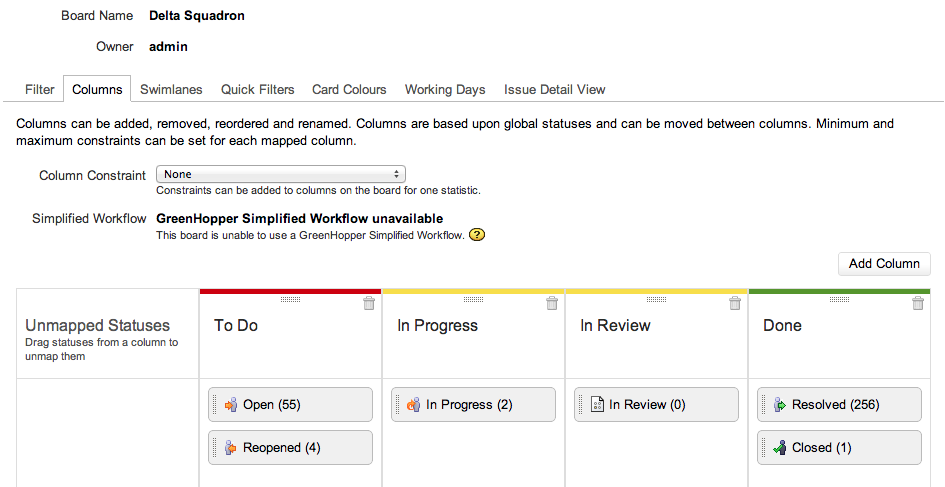
One of the key things about this workflow in GreenHopper is that it is not set in stone. As the team evolves and matures the workflow can easily be amended to introduce new steps or remove existing ones. Further, teams can set up automation around each workflow step: Creating Customer Notifications with JIRA, GreenHopper, Zapier and Twilio SMS gives one example for a customer support team.
What are our tasks?
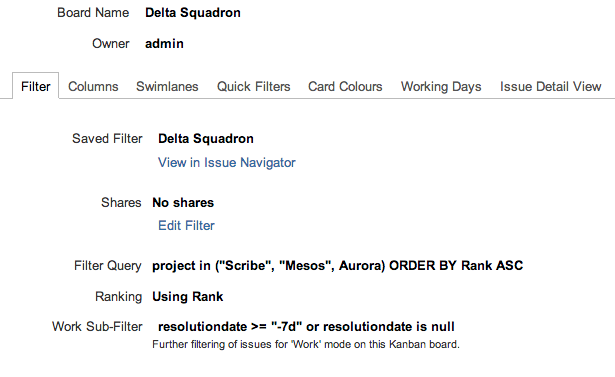
A GreenHopper Kanban board is built upon the flexibility and power of the JIRA Query Language (JQL) ((JIRA Query Language)). JQL enables a board to include issues from one or more projects ((GreenHopper Documentation - Configuring Filters)). For example, Delta Squadron maintains three products so they use the following JQL their board:project in ("Scribe", "Mesos", Aurora) ORDER BY Rank ASCBy default the board is set up for teams that are releasing software versions, so the Work Sub-Filter includes only those issues from an unreleased Fix Version or where the Fix Version is empty for an issue. For teams that are not releasing software ((Releasing a Version on a Kanban board)) you can change the Work Sub-Filter to exclude tasks completed more than seven (for example) days ago:
How do we order the backlog?
The product owner is the team member who is a proxy for the customer. They own the order of tasks in the backlog to ensure the team is delivering the highest customer value items first. To reorder the backlog they simply drag and drop tasks within the To Do column, dragging some up and others down: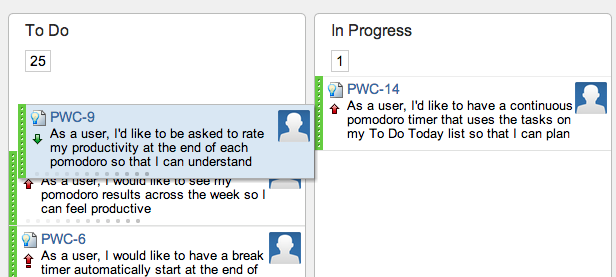
Highlight high priority tasks and blockers
The 'class of service' ((Classes of Service and Policies)) is a key aspect of Kanban. The Delta Squadron team has a class of service in place which represents an SLA contract with their customers - they will respond to any support requests within 4 hours. To visualise this in GreenHopper and ensure the team is responding to these high priority tasks first we use swimlanes.How do we visualise high priority tasks?
Similar to the vertical columns on our board above, swimlanes cut across the board creating rows. We configure the swimlane using the following query:createdDate <= -4h and reporter in membersOf("customers") and status = openThe Delta Squadron example above is just one of many that GreenHopper can support. For example, we could have different response times for different groups of customers. Further, there is an additional swimlane on the Delta Squadron board that shows those blocker issues that are past their due date:
(priority = blocker OR duedate <= now()) AND resolution = UnresolvedNote: A complete list of search options can be found under Advanced Searching with JIRA ((JIRA Query Language)).
How do we run the daily standup?
The Delta Squadron team uses Quick Filters to highlight those issues that have been updated in the last day, and also those that have not been updated in the last day which are still In Progress or In Review. They use the following queries:updatedDate >= -1dand
updatedDate >= -1d and status in ("In Progress", "In Review")
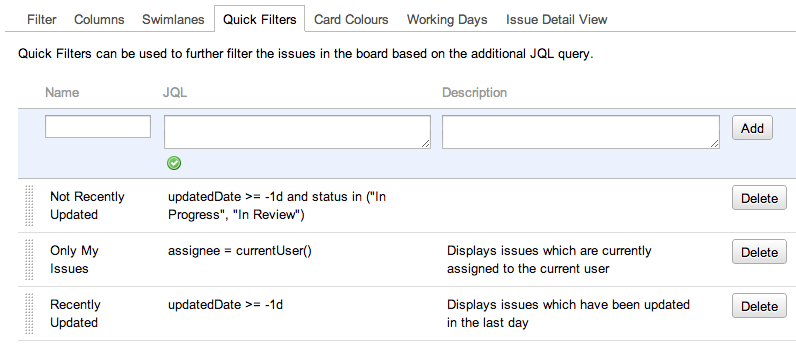
Finally, there is one more configuration option that is very useful, card colours.
How do we visualise types of work?
Teams may want to highlight issues that need attention using card colours. Delta Squadron has settled on bringing attention to bugs that have exceeded SLA. Their board sets the colour of the card to be green when they are stories, yellow for bugs, orange for bugs over one day old and red for bugs over three days old: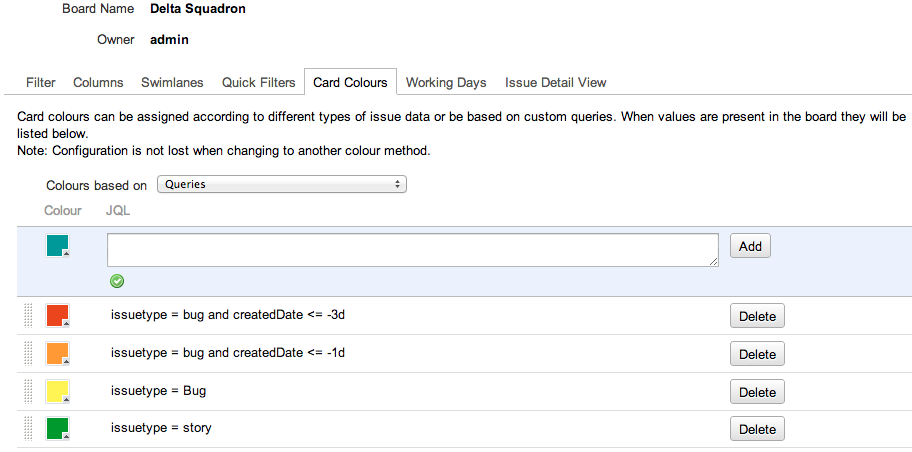
Part 2
Phew, we've covered a lot of ground in Part 1!In Part 2 of Kanban Software Development with GreenHopper’s Rapid Board we explore methods to help teams focus and build trust with customers through:
- limiting work in progress using column constraints, and
- measuring and reporting the cycle time to provide predictability
Find this useful? React on Twitter:
Kanban Software Development with GreenHopper http://t.co/YQR0oUy8Kt
— Nicholas Muldoon (@njm) April 8, 2013